
When you open Outlook to look at an important email, nothing functions properly: the messages get stuck in the Outbox, new emails do not come through, or Outlook continues to display connection errors.
If your Outlook email stopped working, the reason can be an internet connection problem, the mailbox being full, or the need to sign back in to the account.
Before you reinstall Outlook or change some of the complicated settings, try these practical troubleshooting steps.
Why as my Outlook Email stopped working?
If your Outlook email stopped working, you’re not alone. Outlook may stop sending or receiving emails because of internet problems, outdated software, wrong account settings, a full mailbox, or a damaged Outlook profile
The right fix when your Outlook email stopped working depends on whether Outlook has stopped opening, sending, receiving, or all three
1. Verify Your Internet Connection
Begin with the most fundamental steps: open your web browser and go to a website to make sure that your internet connection is functioning.
If the internet is working but Outlook is unable to connect, verify that Outlook is displaying a connection error. Another option is to access your email via Outlook on the web in order to determine if the issue is specific to the desktop application.
If your internet is fine but your Outlook email stopped working anyway, open Outlook on the web to check whether the problem is limited to the desktop app.
2. Verify Whether Outlook Has Stopped Receiving Emails
If Outlook has stopped receiving emails, start by checking the Junk Email folder, the Other tab, and any folders that you have set up yourself. It’s possible that an email rule or filter is moving the messages away from your Inbox.
Then verify if your mailbox storage is full, since Microsoft has stated that full cloud storage can stop Outlook.com users from sending and receiving emails.
It could be due to synchronization or a profile problem if there are new messages in Outlook on the web but not in the desktop version.
If emails reach Gmail but not Outlook, read our guide on Gmail and Outlook not syncing.
3. Fix Outlook Not Sending Emails
When your Outlook email stopped working for outgoing mail only, open your Outbox and check for stuck messages.
A big attachment may stop a message from being sent. Try removing the attachment and sending a smaller file, or share a cloud-storage link instead.
Also check whether you recently changed your email password. If you have, Outlook might require you to sign in again with your new credentials.
For more help, see Microsoft’s guide to issues sending and receiving email.
4. Turn Off Working Offline Mode
An Outlook email stopped working problem is very often caused by Work Offline mode being switched on by mistake.
In the Windows version of Outlook, check the status bar at the bottom of the window. If it says “Working Offline” or “Disconnected,” Outlook may not be able to connect to the mail server.
Go to the Send/Receive tab and check whether Work Offline is turned on. If it is, click it once to turn it off. Then try sending or receiving your emails again.
These are some of the checks Microsoft recommends for Outlook connection problems
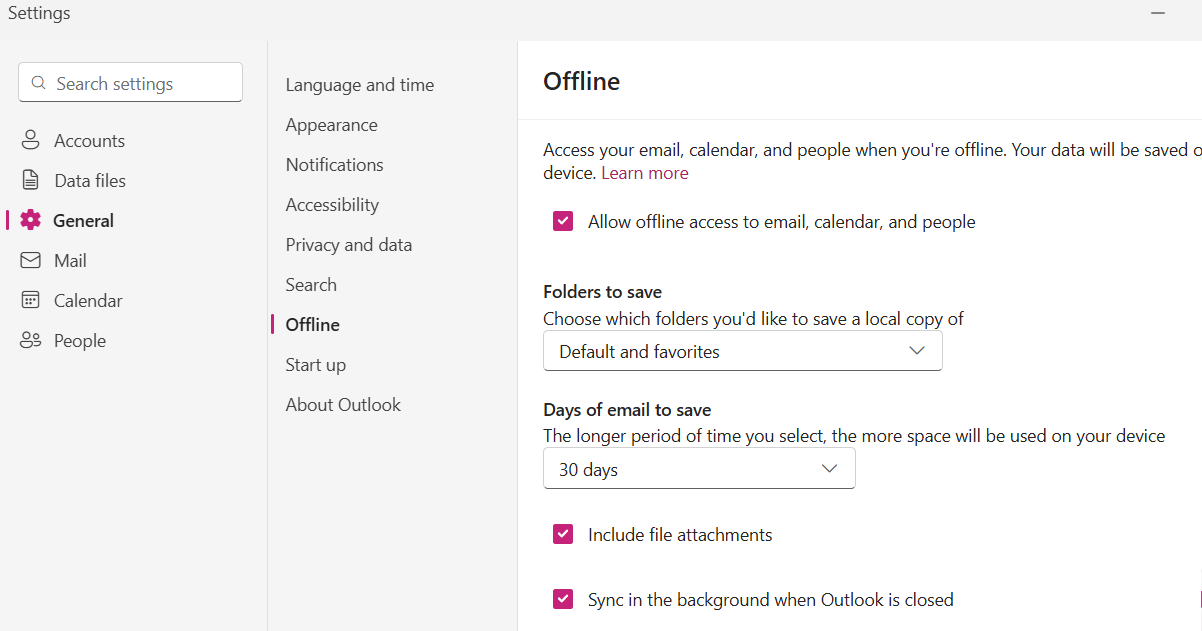
If you use the new Outlook for Windows, there is no Work Offline button. Go to Settings > General > Offline and check that Allow offline access to email, calendar, and people is set the way you want
5. Restart and update Outlook
If your Outlook email stopped working after a Windows update, the simplest solution is often to restart Outlook.
Make sure you completely close the application, then reopen it and check whether your emails are working again. If Outlook still freezes or acts in an unexpected way, install any available Microsoft 365 and Windows updates.
Updates can correct software bugs and compatibility issues that affect email.
6. Check Your Outlook Account Settings
If your Outlook email stopped working right after a password change, sign in again with your new credentials.
If Outlook keeps asking for your password or can’t connect to your email account, check your sign-in details and account settings.
Outlook may not connect properly because of a recent password change, a restricted account, or an authentication issue.
If you use a work or business account, your organization’s Microsoft 365 administrator may need to check the account or service status.
7. Still Seeing Outlook Email Stopped Working? Repair Outlook
If the basic fixes don’t work, your Outlook profile or app may need repairing.
Microsoft recommends checking for profile problems and conflicting add-ins if you use classic Outlook and keep having trouble sending, receiving, or starting it. You can also start classic Outlook in Safe Mode to see whether an add-in is causing the issue.
Do not delete your profile or local data files unless you fully understand what they contain.
Conclusion
Most Outlook email stopped working problems are not as serious as they first seem. A full mailbox, an offline setting, a stuck message, or a sign-in problem can stop your email without needing a full reinstallation.
Start with the simple checks, then move on to the steps that match your issue. If Outlook still can’t send or receive messages, professional support can help you find the cause and get back to your emails.
Frequently Asked Questions
Why has my Outlook email suddenly stopped functioning?
Typical causes are internet problems, difficulties with signing in to the account, the mailbox being full, using outdated software, or errors in the synchronization with Outlook.
Why is Outlook no longer receiving emails?
Look in your Junk Email folder, check the email rules, verify your mailbox storage, and review your synchronization settings. It’s possible that the desktop connection is at fault if the emails reach you via Outlook on the web but not through the desktop application.
Why has Outlook stopped sending emails?
Look in your Outbox for any messages that have become stuck, delete any attachments that are too large, and make sure that Outlook is connected to the mail server.
Is it possible for a complete mailbox to prevent Outlook from working?
Yes, the full Microsoft cloud storage is capable of preventing users of Outlook.com from sending and receiving emails.
How can I restart Outlook if it is frozen?
Reopen Outlook and then close it again. On Windows, if it becomes frozen, use the Task Manager to terminate the Outlook process and then restart it.
Will re-installing Outlook solve the problem?
It isn’t always the case that the problem lies in account settings, connectivity, or issues with the profile. Before deciding to reinstall the application, it’s worth trying some basic troubleshooting steps.
When should I get in touch with an Outlook support service?
If, after carrying out the basic checks, Outlook still fails to work, continues to show errors, or is unable to send or receive important emails, you should contact professional support.
Comments